

Nano Banana Pro, developed by Google and integrated into the Gemini platform, pushes the limits of what seemed possible just a few months ago.
You can now transform your ideas into photorealistic visuals, with precision that rivals professional photography. It is also now possible to integrate logical and relevant text into images.
This technology based on the Imagen 4 model opens unprecedented perspectives for creators, whether they are designers, marketers, or simply passionate about visual creation.
The Advanced Capabilities of Nano Banana Pro for Photographic Realism
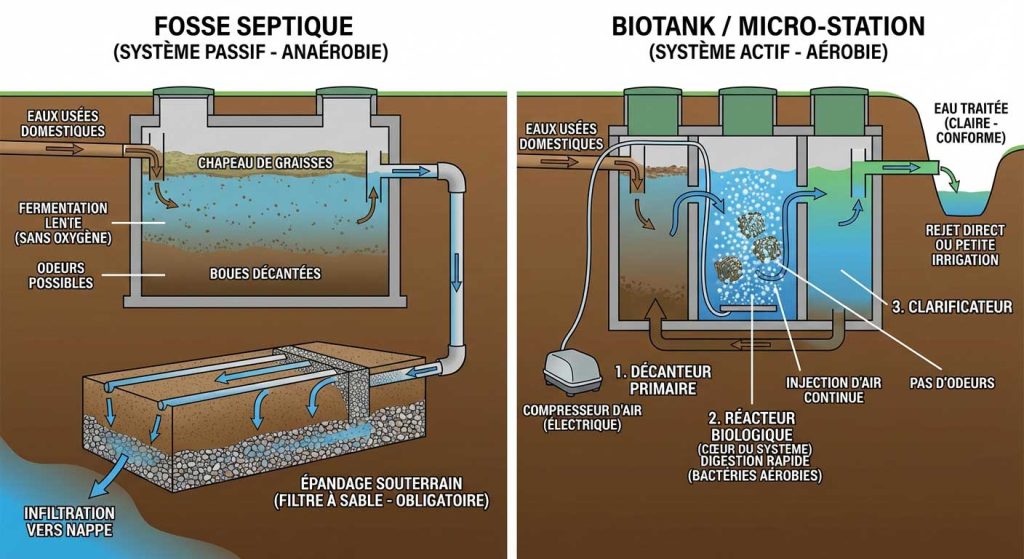
Creating Relevant Diagrams to Illustrate Your Videos, Articles
Here the prompt was: Make a diagram image showing how a biotank works compared to a septic tank.
The Imagen 4 Model in Service of Physical and Lighting Precision

Nano Banana Pro relies on Imagen 4, an AI model that understands the physical laws of the real world. This understanding translates into images where gravity, object interactions, and reflections respect natural rules. You thus obtain visuals where each element finds its place coherently, as in a real photograph.
Dynamic lighting is one of the major advances of this technology. You can switch from a sunny scene to a nocturnal atmosphere, adjust cast shadows, and create varied atmospheres. This mastery of light is reminiscent of the possibilities offered by other image generation tools that have marked the recent evolution of generative AI.
Perfectly Clear and Readable Text Rendering in Your Creations
Previous models stumbled on a major obstacle: integrating readable text into generated images. Nano Banana Pro overcomes this barrier with its advanced text rendering. You can now create logos, posters, invitations, or comics with perfectly clear and coherent words.
This feature works in many languages, considerably expanding your creative possibilities. Characters integrate naturally into your composition, without the distortions or inconsistencies that characterized previous generations.
Prompt: Generate a brochure for a company that sells swimming pools

2K Resolution and Improved World Knowledge
Prompt: Photo of a girl on a swing on a beach above the sea

The 2K resolution offered by Nano Banana Pro guarantees sharp images suitable for professional use. This superior quality allows you to use your creations on different media, from web to print, without loss of detail.
The improved world knowledge is particularly evident in the generation of infographics and diagrams. The model better understands spatial relationships, proportions, and technical details, producing more accurate and detailed results.
| Technical Feature | Capability | Practical Application |
|---|---|---|
| Maximum resolution | Up to 2K (some restorations in 4K) | Professional prints, high-definition display |
| Generation speed | A few minutes per image | Quick iterations to test different versions |
| Supported languages | Many languages for integrated text | International communication, multilingual projects |
| Base model | Imagen 4 | Physical coherence and advanced photorealism |
Professional Creative Controls That Transform Your Images
Precise Modifications of Lighting, Angle, and Focus
Nano Banana Pro gives you access to advanced camera controls that radically transform the atmosphere of your creations. You can adjust the viewing angle to find the perfect framing, exactly like a photographer would change position around their subject.
Selective focus allows you to highlight your main subject by playing with depth of field. This technique, borrowed from professional photography, naturally guides the viewer’s gaze toward the important elements of your composition.
High-Performance Photo Fusion for Complex Compositions
The ability to combine multiple photos is a major asset for creators. Nano Banana Pro excels in photo fusion, allowing you to create compositions impossible to achieve otherwise. You can blend elements from different images while maintaining perfect visual coherence.
This feature proves particularly useful for mockups and visual concepts. You assemble disparate elements into a single harmonious image, where transitions between different sources remain invisible.
Intelligent Resizing for All Your Distribution Formats
Each platform imposes its own format constraints. Nano Banana Pro simplifies this complexity with its intelligent resizing. You instantly adapt your creations to required dimensions, without cropping important details or compromising composition.
This automation saves you precious time. Instead of manually recreating each version, you quickly generate optimized variations for Instagram, Facebook, LinkedIn, or any other distribution channel.
- Automatic adaptation to square, vertical, and horizontal formats
- Preservation of key elements during cropping
- Maintaining visual quality regardless of final size
- Quick generation of multiple versions for different platforms
Accessing Nano Banana Pro and Optimizing Your Results
The Differences Between Nano Banana and Nano Banana Pro
Google offers two distinct versions of its image generation technology. Nano Banana, based on the “Fast” model, is perfectly suited for simple and quick creations. This version excels in character consistency, basic photo fusion, and local modifications.
Nano Banana Pro, using the “Reasoning” model, adds a complete suite of professional features. You benefit from advanced text rendering, precise lighting and angle modifications, 2K resolution, improved world knowledge, and more performant photo fusion.
| Feature | Nano Banana | Nano Banana Pro |
|---|---|---|
| Character consistency | Yes | Yes |
| Photo fusion | Basic | Advanced (more photos) |
| Text rendering | Standard | Advanced and precise |
| Lighting controls | Limited | Professional |
| Maximum resolution | Standard | 2K |
| World knowledge | Standard | Improved |
Steps to Generate Your First Ultra-Realistic Image
Start by accessing the Gemini platform via Google’s official website. Google AI Plus, Pro, and Ultra users enjoy the highest level of access to Nano Banana Pro. For other users, you will need to enter an API key.
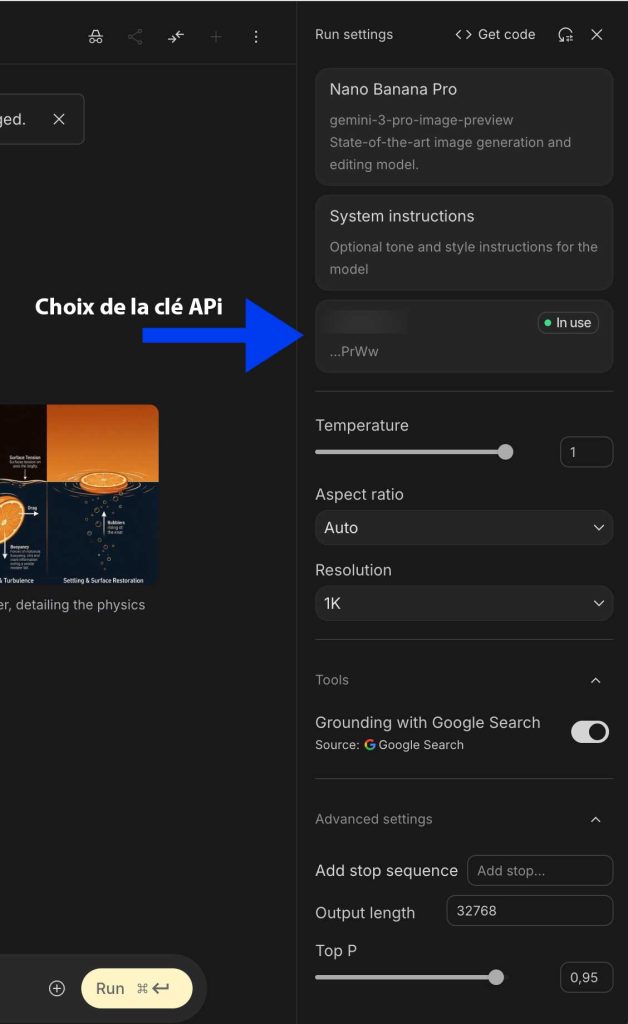
Then write a detailed description of the desired image. The more precise your prompt, the better the results. Mention key elements, atmosphere, lighting, and important details. For example: “A futuristic city at sunset with glass skyscrapers reflecting the last orange rays, flying vehicles, and a misty atmosphere.”
Start the generation and wait a few minutes. Once the image is created, explore the editing tools to refine the result. Adjust the lighting if necessary, modify the viewing angle, or add text. Test different variations until you get exactly what you are looking for.
- Access Gemini and activate Nano Banana Pro
- Write a detailed prompt with all desired elements
- Generate the image and wait for processing
- Use advanced controls to refine the result
- Resize according to your distribution needs
- Download in high resolution
Ethical Precautions to Follow When Using the Tool
The power of Nano Banana Pro raises important ethical questions. The ability to generate ultra-realistic images can be misused to create misleading content. Recent articles have highlighted the possibility of generating official documents of disturbing realism, potentially usable for fraud in certain countries.
Use this tool responsibly and transparently. Clearly indicate when an image has been generated by AI, particularly in a professional or journalistic context. Respect copyright and do not reproduce the style of living artists without their consent.
Google has established ethical guidelines to govern the use of its generative AI tools. Familiarize yourself with these recommendations before distributing your creations. Technology should serve creativity and innovation, not disinformation or fraud.


