

Manually modifying a hundred marketing videos to change a simple logo or a line of text represents a colossal waste of time and a frequent source of errors for creative teams. This artisanal approach hinders the scalability of your campaigns and unnecessarily inflates production costs as soon as the volume of content increases.
Remotion eliminates this operational friction by transforming video creation into a standardized web development process, capable of generating thousands of dynamic MP4 files without ever opening traditional editing software. This framework allows developers to use their current skills to automate and industrialize multimedia production.
Remotion now has Agent Skills – make videos just with Claude Code!
— Remotion (@Remotion) January 20, 2026
$ npx skills add remotion-dev/skills
This animation was created just by prompting 👇 pic.twitter.com/hadnkHlG6E
How Remotion Transforms React into a Video Production Studio
A Framework That Generates Real MP4 Videos with React
Remotion does not merely display animations in a browser; it is a complete rendering engine that produces actual video files. By leveraging standard web technologies like HTML5 Canvas, CSS, and SVG, you build your scenes directly in JavaScript or TypeScript. The tool then captures each frame generated by your components to assemble them via FFmpeg, thus creating an MP4, WebM, or even a GIF file ready for distribution.
Key Components for Frame-by-Frame Animation

Remotion’s logic relies on a declarative approach familiar to frontend developers. You define your video structure using specific React components that manage time and layout. The useCurrentFrame hook gives you access to the current frame number, which allows calculating animation states in a mathematical and predictive way. For example, to create smooth motion, you bind CSS properties to the progression of the current frame divided by the frames per second (FPS).
Here are the fundamental elements you will work with:
- Composition: The entry point that defines global metadata such as resolution (width/height), duration in frames, and refresh rate (FPS).
- Sequence: A component that allows you to order your clips on the timeline, facilitating sequential editing without complex delay calculations.
- Interpolate: An essential utility function for mapping time progression (frames) to animation values (opacity, position, scale).
From Code to Final Render in a Few Commands
The production workflow integrates naturally into a continuous integration/continuous deployment (CI/CD) pipeline. After installing prerequisites like Node.js and FFmpeg, you initialize a project with a simple command. Development is done with real-time preview via Remotion Studio, an interactive player that launches in your browser and allows scrubbing the timeline to verify every detail.
Once the video is coded, the final file generation runs via the terminal. This automation capability opens the door to programmatic rendering: you can inject external data (GitHub API, weather, client databases) via props to generate thousands of unique variants of the same video in a single build command.
Remotion’s Integration with Claude Code and AI Tools
Documentation Optimized for AI Agents
The Remotion team has structured its technical documentation to be easily consumed by coding assistants. Each documentation page has a raw Markdown version accessible simply by modifying the URL or via content negotiation. This architecture allows conversational agents to retrieve up-to-date and accurate information about the framework’s APIs without hallucinating about non-existent features.
How to Use Claude Code to Generate Remotion Projects
The alliance between Remotion and next-generation assistants drastically accelerates the prototyping phase.
To install the Remotion skills:
$ npx skills add remotion-dev/skills
You can ask an AI to script an entire video by simply describing the scenario and desired animations. Claude Code goes beyond simple vibe coding by understanding the structure of React components to propose solid architectures from the first draft, integrating best practices like using video configuration hooks.
Remotion now has Agent Skills – make videos just with Claude Code!
— Remotion (@Remotion) January 20, 2026
$ npx skills add remotion-dev/skills
This animation was created just by prompting 👇 pic.twitter.com/hadnkHlG6E
Prompts and the MCP System to Accelerate Development
To obtain immediately usable results, using precise contexts is necessary. This is where the MCP standard comes in. By connecting your development environment to an MCP server dedicated to Remotion documentation, you give the AI direct access to the framework’s syntactic rules. You better understand the principle of a Model Context Protocol when you see the assistant correct its own import errors or suggest using zod to validate the props of your video schemas, thus ensuring robust and typed code.

Pricing and Real Production Costs with Remotion
The Free License versus Company and Enterprise Plans
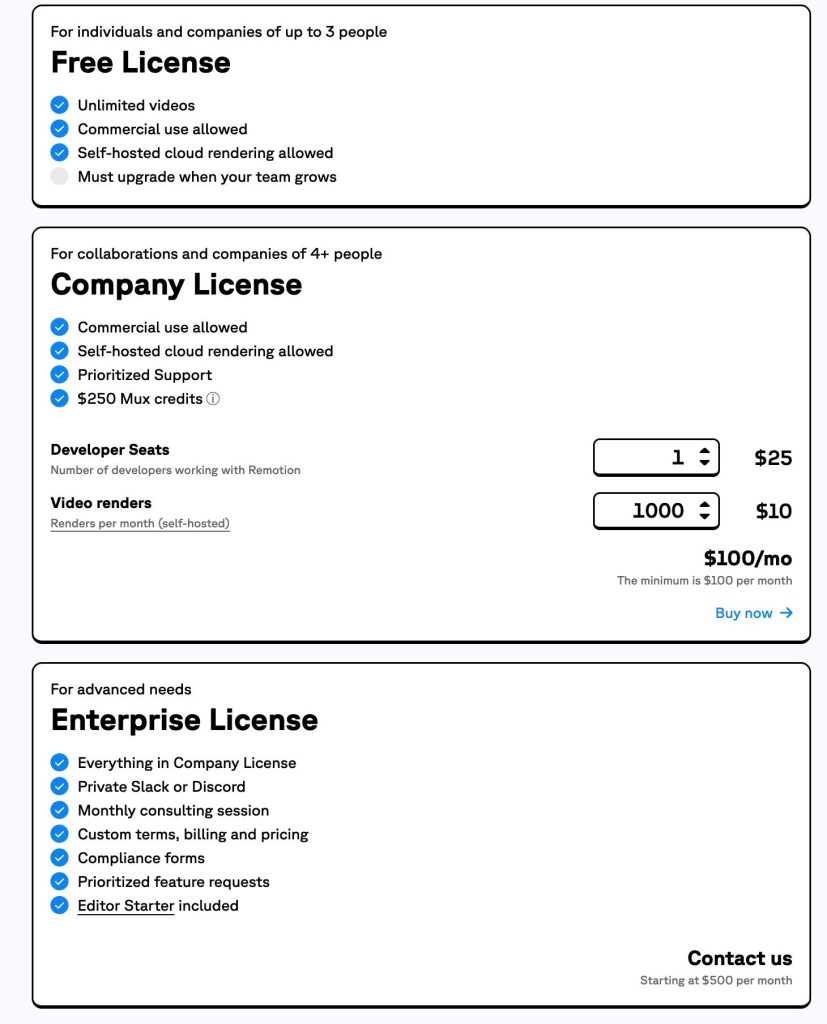
Remotion’s business model distinguishes individual use from large-scale commercial use. The framework remains accessible at no cost for small projects, which encourages adoption by the open-source community and startups in their launch phase. However, as the team grows, acquiring a license becomes mandatory to legally exploit the technology in production.
| License Type | Eligibility Conditions | Pricing |
|---|---|---|
| Free | Individuals, non-profits, companies with 3 or fewer employees | $0 (Commercial use authorized) |
| Company | Companies with 4 or more employees | Custom quote (remotion.pro) |
| Enterprise | Large organizations requiring support | Starting at $500/month (Priority support, private Slack) |
Rendering Costs on AWS Lambda Based on Your Needs
Video rendering consumes a lot of CPU resources. To avoid blocking your local machines, Remotion offers a serverless architecture via Remotion Lambda on AWS. This solution allows parallelizing frame computation, drastically reducing rendering time, but generates variable cloud costs. The price depends on allocated memory, video duration, and especially the “cold start” of Lambda functions.
| Rendering Scenario | Processing Time | Estimated Cost (AWS) |
|---|---|---|
| Hello World (7 sec) | ~7.5 sec | $0.001 |
| Local Video (1 min) | ~19 sec | $0.017 |
| 4K Video (10 sec) | ~45 sec | $0.013 |
| Complex HD Video (10 min) | ~56 sec | $0.103 |
When to Choose Local or Serverless Rendering
The choice of rendering method directly impacts your budget and velocity. Local rendering is more than sufficient for one-off projects or for testing concepts on the developer’s machine. However, for a SaaS application that allows users to generate personalized videos on demand, the serverless option is essential. It absorbs load spikes by launching hundreds of lambdas simultaneously, ensuring that your user receives their video in seconds, regardless of the number of concurrent requests.


