

Imagine a tireless colleague capable of sorting your files, answering your emails, and managing your Excel spreadsheets without ever complaining. Anthropic is turning this dream into reality with a feature that goes beyond simple text conversation to act directly on your computer.
Artificial intelligence is no longer content with just giving you advice; it now takes the controls to execute concrete actions on your behalf. This major evolution marks the transition from a passive assistant to a true autonomous agent integrated into your work environment.
How Does Claude Cowork Automate Your Office Tasks Without Coding?
The main innovation lies in the AI’s ability to interact directly with your operating system. Unlike traditional chatbots, this new agentic tool installs itself at the core of your machine to manipulate files and software.
An agentic assistant that accesses your local files
You give the application permission to enter a specific folder on your computer. This secured and isolated zone becomes the playground where the agent can read, edit, or create documents according to your directives.
This approach is directly inspired by previous technical tools, but it democratizes access to automation for the general public. While developers were already using Claude Code as much more than a vibe coding tool for programming, this new iteration now allows any professional to benefit from the same execution power without writing a single command line.
Autonomous and parallel execution capabilities
The agent doesn’t just execute a single action before waiting for the next one. It develops a complex plan, divides the work into multiple steps, and can even handle tasks in parallel to save time.
While it analyzes a large document, it can simultaneously prepare a summary email. You simply monitor the progress via a sidebar, intervening only if a human decision or confirmation is needed.
Integrations with your daily tools
The strength of this system lies in its ability to connect to the applications you use every day. Through external connectors, the assistant communicates with platforms like Gmail, Asana, or Slack to retrieve information or deliver results.
Diagnostic: Delegating to AI
Claude Cowork promises to do your work for you. But is your current setup compatible? Answer 3 questions to discover your automation potential.
1. What is your operating system?
The agent must install itself at the core of your machine.
2. Are you ready for the Claude Max plan?
Access to Cowork requires a specific subscription (approx. 0-200/month).
3. What software do you use?
Select your daily tools (multiple choices possible).
Here is an overview of the available integrations and their main functions:
| Connected Application | Type of Action Performed | Application Example |
|---|---|---|
| Gmail | Communication | Drafting and sending emails based on analyses |
| Google Drive | Storage | Organizing and retrieving remote documents |
| Slack | Collaboration | Sending status updates to the team |
| Chrome (Claude in Chrome) | Web Browsing | Form filling and data extraction |
Customizable skills tailored to your needs
The tool comes with a robust set of initial skills, including presentation creation and spreadsheet management. However, you have the freedom to extend its capabilities through the “Skills for Claude” feature.
This customization allows you to adapt the agent to your specific workflow. Whether you need to monitor prices online or manage subscriptions, the AI learns to use the necessary tools to accomplish the mission.
Concrete use cases for delegating your work to Claude Cowork
Theory gives way to practice as soon as you launch the application for the first time. The usage scenarios cover both repetitive administrative tasks and more complex data analyses.
Automated organization and document management
The “Downloads” folder is often a chaos of poorly named files and scattered documents. You can ask the agent to scan this folder, identify the content of each file, and rename everything according to a specific convention.
It then sorts the items into thematic subfolders without you having to lift a finger. This intelligent sorting capability transforms a weekly chore into an operation that takes just seconds.
Creating reports and presentations from your data
Transforming raw notes or screenshots into professional documents becomes instant. The AI can analyze a receipt image, extract the numbers, and generate a perfectly formatted expense spreadsheet.
Similarly, it can draft a first version of a report by synthesizing multiple text files scattered across your hard drive. The result is a structured document, ready to be reviewed or sent.
Time-consuming web and administrative tasks
The browser integration allows you to delegate actions that typically require numerous clicks. The agent takes control to navigate websites, search for information, or interact with online services.
Here are some examples of tasks you can entrust to your assistant:
- Searching and comparing vacation deals with results compiled in a spreadsheet.
- Cleaning up your inbox by unsubscribing your email address from unwanted newsletters.
- Retrieving and organizing photos from various online sources.
- Canceling services or subscriptions by navigating through the complex menus of customer accounts.
- Monitoring dashboards to alert you of any metric changes.
Data analysis and professional communication
The agent excels at processing numbers, such as comparing weekly revenue with historical data. It doesn’t stop at calculations, as it can then open your messaging tool to compose an email summarizing these analyses for your manager.
This fluidity between local analysis and external communication eliminates tedious copy-pasting. You simply validate the content before final sending.
Security, limitations, and access to Claude Cowork
Entrusting control of your computer to an artificial intelligence legitimately raises security questions. Anthropic has integrated several safeguards to ensure that the agent’s autonomy does not turn into a risk for your data.
Protection measures for your files and data
The system architecture relies on a “sandboxed” environment, isolating the AI’s actions from the rest of your critical system. Access is strictly limited to the folder you explicitly authorized during setup.
Additionally, an integrated virtual machine adds an extra layer of separation. Before any potentially destructive action, such as deleting a file or sending a message, the agent mandatorily requests your manual validation.
Risks to know and best practices for use
Despite these precautions, the AI’s interpretation of instructions can sometimes lead to errors. An ambiguous directive could theoretically result in the modification or deletion of important files if the user validates the action too quickly.
“Prompt injection” attacks represent another risk vector, where malicious external data (such as a trapped website read by the agent) could attempt to alter the assistant’s action plan. It is advisable to start with simple tasks and not expose sensitive data during this preview phase.
Current availability and pricing for Claude Max subscribers
Access to this advanced technology is currently reserved for an elite group of users. The Cowork feature is only available as a "research preview" via the macOS application.
To unlock these capabilities, you need to subscribe to the higher plan. Many users seek to know exactly what are the pricing plans for Claude AI Anthropic to evaluate whether the investment in the Claude Max plan, which ranges between 100 and 200 dollars per month depending on usage, is justified for their business.
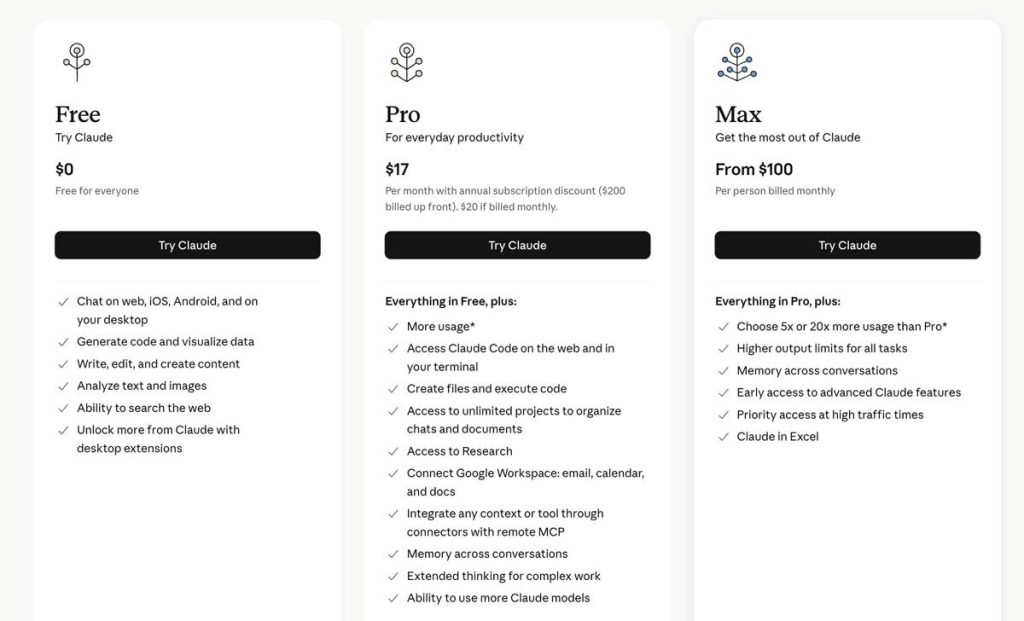
| Subscription Plan | Estimated Monthly Cost (USD) | Access to Cowork (macOS) |
|---|---|---|
| Claude Free / Pro | Free / $20 | Waitlist |
| Claude Team | Variable per user | Waitlist |
| Claude Max | $100 – $200 | Immediate Access (Preview) |
Users on standard plans must currently sign up for a waitlist. The company plans to extend compatibility to Windows and improve cross-device synchronization in future updates.


